
Cinematic contact sheet
Review an AI still sequence the way a film lab would: one grid, clear selection marks and a continuity check that catches drift before the edit.
What is a cinematic contact sheet?
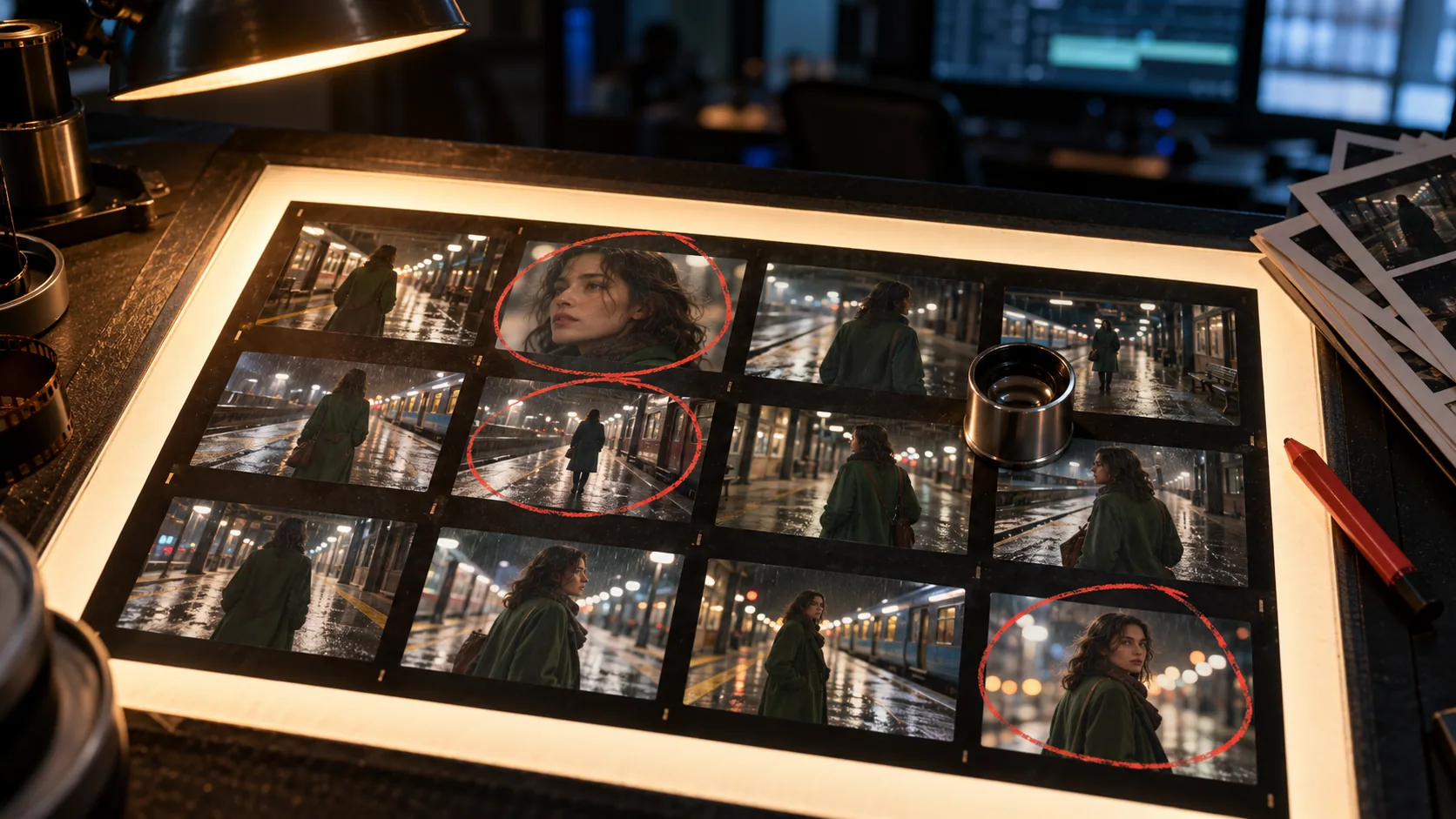
A cinematic contact sheet is a grid of frames from one sequence printed or laid out on a single sheet. In a darkroom it was the first proof of a roll; on a film set it is the quickest way to compare coverage, continuity and exposure without opening every frame full size.
It is not a storyboard. A storyboard is a plan made before the render; a contact sheet is a review made after it. The AI storyboard generator covers the planning side. This page covers the review side, where the frames already exist and the job is to choose, reject and catch drift.
For AI stills, the contact sheet is especially useful because the differences between frames are often small. A face drifts by a few millimeters, a coat changes from olive to green, a lamp moves two feet left. At full size each frame can look convincing; on one sheet the drift is obvious.
What should a contact sheet contain?
A useful contact sheet contains the frames, a shot identifier, the selection marks and a small amount of continuity metadata. It should not contain so much information that the images become secondary. The sheet is a visual index first.
- A clean grid of frames, all at the same aspect ratio.
- Shot number or scene identifier in the margin.
- Selects, maybes and rejects marked consistently.
- One reference frame or approved look at the edge.
- Lens, light and stock notes for the scene.
- The date and scene name, so the sheet can be filed.
| Element | Purpose | Keep it small |
|---|---|---|
| Frame grid | Compare composition, face, wardrobe and light at a glance. | Six to twelve frames per sheet for review. |
| Selection marks | Separate the keepers from the maybes and rejects. | One consistent mark per category. |
| Reference frame | Anchors the approved look for the sequence. | One frame, not a second grid. |
| Continuity notes | Records the decisions that must survive the next render. | Three or four short lines. |
| Scene metadata | Makes the sheet searchable and comparable. | Shot, scene, date, lens, light, stock. |
How many frames should you put on one sheet?
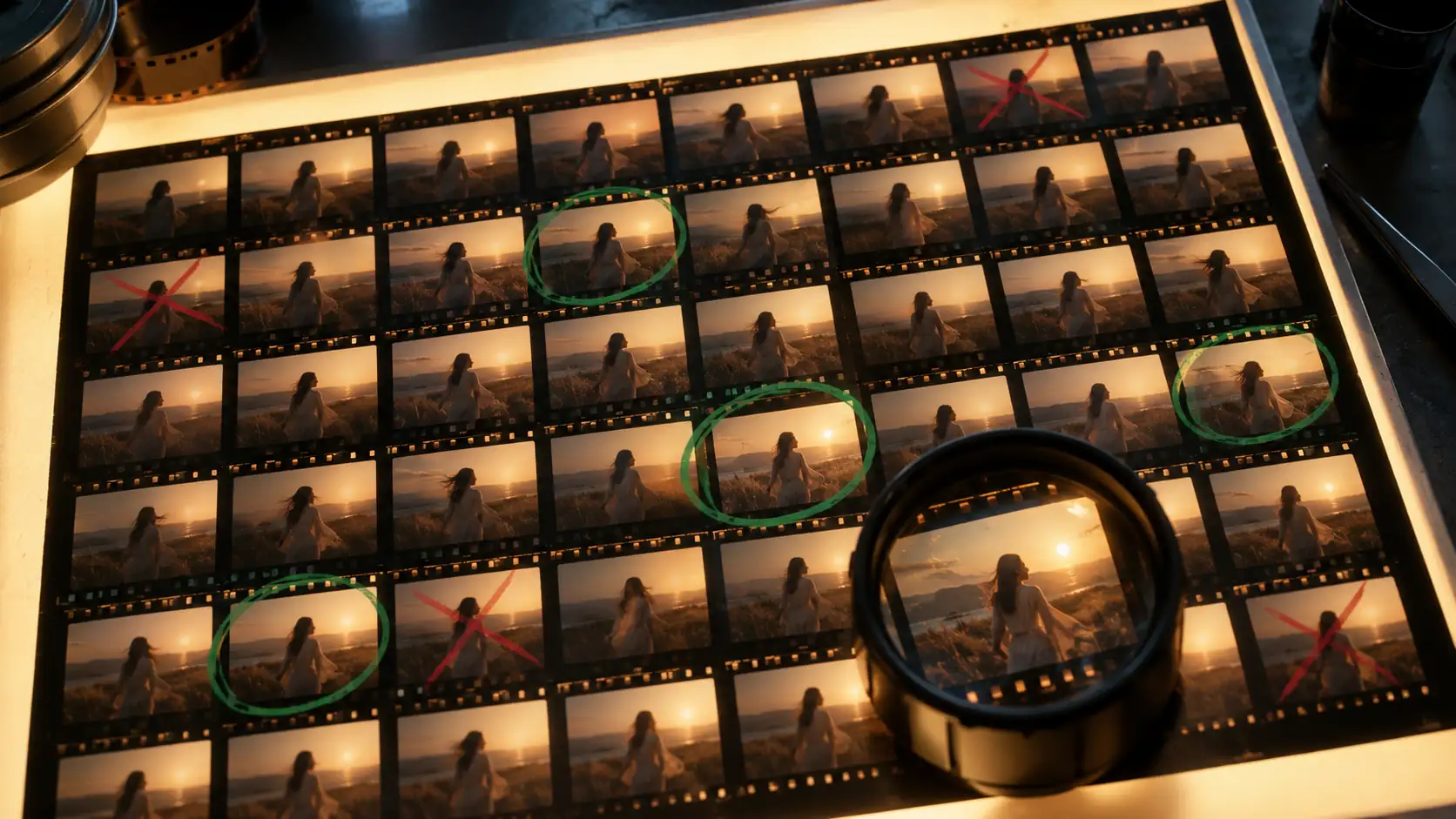
Use six frames for a first review, twelve for a scene and thirty-six for a full sequence or a roll-style proof. The number matters less than the size: if the frames are too small to judge the face and the wardrobe, the sheet is too dense.
A six-frame sheet is the best default for AI stills because it matches the typical sequence length and keeps each frame large enough to read. A twelve-frame sheet is better for coverage; a thirty-six-frame sheet is for a full roll or a long scene and should be treated as an index, not a final selection.
| Sheet size | Best for | Trade-off |
|---|---|---|
| 6 frames | First look, continuity test, client review. | Large frames, limited coverage. |
| 12 frames | Scene coverage, selects, comparing two setups. | Smaller frames, still readable. |
| 36 frames | Full roll, long sequence, archive index. | Faces and wardrobe become hard to judge. |
How do you build a contact sheet from AI stills?
Render the frames with the same brief, then export them at 2K before assembling the sheet. Keep the aspect ratio identical; a mixed-ratio grid makes the comparison misleading. Arrange the frames in shot order, not in order of preference, so the sheet tells the story of the sequence.
Add the selection marks after the first pass. Review the unmarked sheet at thumbnail size first, then mark the frames you would keep. If you mark while rendering, you tend to defend the frames you just paid for instead of judging the sequence.
- Render the sequence with one character, light and lens brief.
- Export every frame at the same 2K resolution and aspect ratio.
- Arrange the frames in shot order on a neutral background.
- Review the unmarked sheet at thumbnail size.
- Mark selects, maybes and rejects with one consistent system.
- Write the continuity notes before starting the next sequence.
How do you mark selects, maybes and rejects?
Use one mark per category and keep it consistent across every sheet. A green circle for a select, a yellow dash for a maybe and a red cross for a reject is enough. The marks should be readable at a glance and should not cover the face or the wardrobe.
Add a one-line reason for every maybe. “Face good, coat wrong” is more useful than a yellow dash alone, because it tells the next render what to fix. Rejects do not need a reason unless the same failure repeats across the sheet.
- Green circle: select; approved for the sequence.
- Yellow dash: maybe; one specific element is unresolved.
- Red cross: reject; do not use in the edit.
- One reason per maybe, written in the margin.
- No marks over the face, hands or wardrobe details.
- Re-mark the sheet after any re-render.
What continuity problems does a contact sheet expose?
The sheet exposes four families of drift: identity, wardrobe, location and optics. Identity drift shows up as a different face across the grid. Wardrobe drift shows up as a coat that changes color or loses a collar. Location drift shows up as architecture or props moving. Optics drift shows up as a different lens, focus or grain from frame to frame.
It also exposes coverage problems. If every frame is a medium shot, the sequence has no wide or close-up. If every frame faces the same direction, the scene has no reverse. The contact sheet makes those gaps visible before the edit.
- Face and hair: does the same person appear in every frame?
- Wardrobe: does the coat keep its color, length and collar?
- Location: do the architecture, props and light direction stay fixed?
- Optics: do lens, focus and grain match across the grid?
- Coverage: is there a wide, medium, close-up and reverse?
- Screen direction: does the subject stay on the same side of the frame?
How does a contact sheet differ from a storyboard?
A storyboard is drawn or rendered before the shoot and describes what each shot should be. A contact sheet is assembled after the renders and describes what you actually have. The storyboard asks “what is the shot?” The contact sheet asks “which frame survives, and what drifted?”
A shot list sits between them: it is the textual inventory of coverage. The shot-list image generator turns that inventory into frames; the contact sheet is how you review the result. If the sequence is going to motion, the storyboard-to-video workflow takes the approved frames into clips.
What is a six-frame contact sheet test?
The six-frame test is a compact proof of a scene: one wide, one medium, one close-up, one reverse, one insert and one hero frame. Put them on one sheet and review them together. If the six frames read as one scene, the sequence has a spine.
The test is deliberately repetitive. It isolates the coverage that most scenes need and exposes the gaps that a folder of similar medium shots hides. It also gives you a reference sheet for the next scene in the same world.
- Wide establishing frame that explains the space.
- Medium frame that carries the performance.
- Close-up that carries the emotional beat.
- Reverse or over-the-shoulder frame that shows the other side.
- Insert or detail that carries the story information.
- Hero frame that the scene is built around.
How do you present a contact sheet to a client?
Present one sheet per scene, not one sheet for the whole project. Keep the grid to six or twelve frames, mark the selects clearly and include the approved reference frame. A client should be able to understand the sequence and the decisions without opening a folder.
Put the selection marks and the continuity notes on the sheet, not in a separate email. If a frame is a maybe, say what is unresolved. If a frame is rejected, leave it visible but marked; the client may want to see the alternative that was considered.
Frequently asked
What is a cinematic contact sheet?
It is a grid of frames from one sequence reviewed on a single sheet. It is used to compare coverage, continuity and exposure, and to mark selects, maybes and rejects before the edit.
How many frames should a contact sheet have?
Six for a first review, twelve for a scene and thirty-six for a full sequence or roll. The frames must stay large enough to judge the face and wardrobe; if they do not, the sheet is too dense.
How do I mark selects on a contact sheet?
Use one consistent mark per category: green circle for select, yellow dash for maybe and red cross for reject. Add a one-line reason for every maybe, and keep the marks off the face and wardrobe.
What continuity problems can a contact sheet reveal?
Identity, wardrobe, location and optics drift, plus coverage gaps such as a missing wide, close-up or reverse. The grid makes small differences visible before the edit.
Does Soul Cinema create contact sheets automatically?
Soul Cinema renders the stills; the contact sheet is assembled from those frames in an image editor or layout tool. The page explains the review format and the marks; it is not a separate export feature.
Can I use a contact sheet for client review?
Yes. One sheet per scene with six or twelve frames, clear selection marks and a short continuity note is usually more useful than sending a large folder of full-size renders.
Your first cinematic frame is one prompt away
Sign in with Google, pick a plan and keep every still at the resolution the model produced. Plans from $12/month, cancel at any time. No watermark, no re-encode.