
AI sci-fi movie stills
A grounded sci-fi workflow for AI stills: human scale, industrial texture, practical screens and six scene briefs that avoid the neon-and-chrome default.
What makes sci-fi read as film?
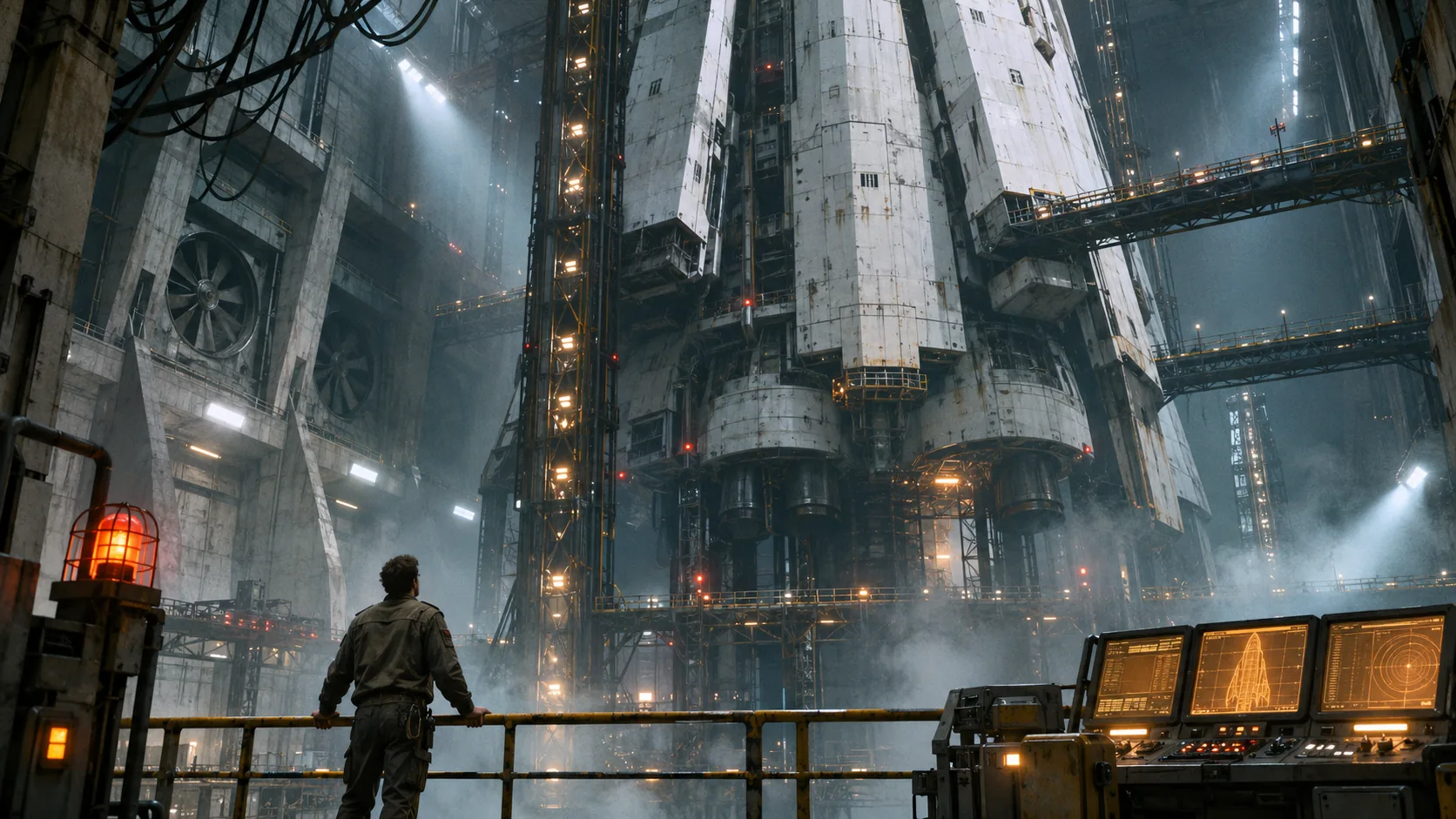
Science fiction reads as film when the future looks used. The frame needs scale, a human reference point, industrial texture and a light source that belongs to the world. A slick chrome corridor with purple neon reads as a screensaver; a hangar with scratched paint, cable bundles and a tired engineer reads as a place.
The useful controls are the same ones that make any still cinematic — lens, light, composition, stock — applied to a production design with one clear technological idea. The composition guide covers scale and depth; this page covers the genre-specific signals.
Soul Cinema renders the still. The sequence — the same ship, the same engineer, the same industrial logic — is where the world either holds or turns into a mood board.
How do you build scale?
Put a human in the frame and make the structure around them enormous. A railing, a gantry, a hangar door or a spacecraft hull should continue beyond the frame edges. Repetition helps: rows of lights, identical bays, cables running into the distance. The eye needs a unit of measure.
Use a wide lens and a low or eye-level camera for the scale shot, then switch to a longer lens for the human detail. If every frame is a wide shot, the sequence loses intimacy; if every frame is a close-up, the world disappears.
- One human figure for scale.
- A structure that continues beyond the frame.
- Repeating modules: lights, bays, cables, windows.
- Atmospheric haze to separate the planes.
- Wide lens for the scale shot, longer lens for detail.
- A visible path through the space.
How do you light practical screens?
Screens are the most useful light source in sci-fi because they are motivated and they put color on the face. A console, a cockpit display, a wall of monitors or a tablet can key the character with cold blue-white light while the rest of the room stays dark. The screen should not blow out to pure white; keep some structure in the interface.
Use screen light as a key or a strong fill, not as a global wash. Put a warm practical somewhere else in the frame so the palette has a second anchor. If every surface is blue, the frame loses depth and the human skin turns plastic.
- One screen as the key or strong fill.
- Cold blue-white screen light, warm practical elsewhere.
- Reflections on glass, visors or metal.
- Screen content soft and abstract, no readable text.
- Skin still readable, not fully blue.
- A dark area for the eye to rest.
How do you design a believable future?
Pick one technological idea and make everything else ordinary. A ship that mines ice, a station built around a single reactor, a colony with limited water: the constraint is what makes the design believable. Add wear, repairs, cable bundles, vents and analog controls that suggest maintenance.
Avoid the everything-future problem: holograms, chrome, neon, robots and floating interfaces in the same frame. One idea, executed with texture, is stronger than five ideas competing for attention.
Scale also comes from labor. A ship with no workers, no storage and no repairs reads as a rendering rather than a place. Put a toolbox, a worn seat, a repair patch or a handwritten label in the frame. Those ordinary objects tell the viewer that someone has to maintain the future, which makes the technology feel real.
- One clear technological premise.
- Utilitarian materials: painted metal, concrete, rubber, glass.
- Signs of maintenance: scratches, patches, cable bundles.
- Analog controls next to screens.
- A human job in the space.
- No floating holograms unless they are the one idea.
How do you avoid generic neon and chrome?
Replace neon with practical light and replace chrome with painted industrial metal. Neon is a shorthand for “future city”; it is not a requirement. A hangar lit by sodium work lamps, a corridor with emergency red, a cockpit with cold displays: these read as science fiction without the cyberpunk default.
If you want neon, make it diegetic: a sign, a console, a warning light. Keep it to one accent and let the rest of the frame stay industrial. The same rule applies to chrome: a little is a material choice, a lot is a style cliché.
Most of the frame should be explainable: a light has a switch, a panel has a purpose, a cable goes somewhere. If you cannot say what a surface is for, remove it. Restraint is what makes the one glowing screen feel important.
- Practical work lights instead of neon washes.
- Painted metal, concrete and rubber instead of chrome.
- One neon accent, tied to a visible source.
- Emergency red, sodium amber or cold display blue.
- No purple-and-teal global grade.
- Texture before glow.
Which six sci-fi scenes should you brief?
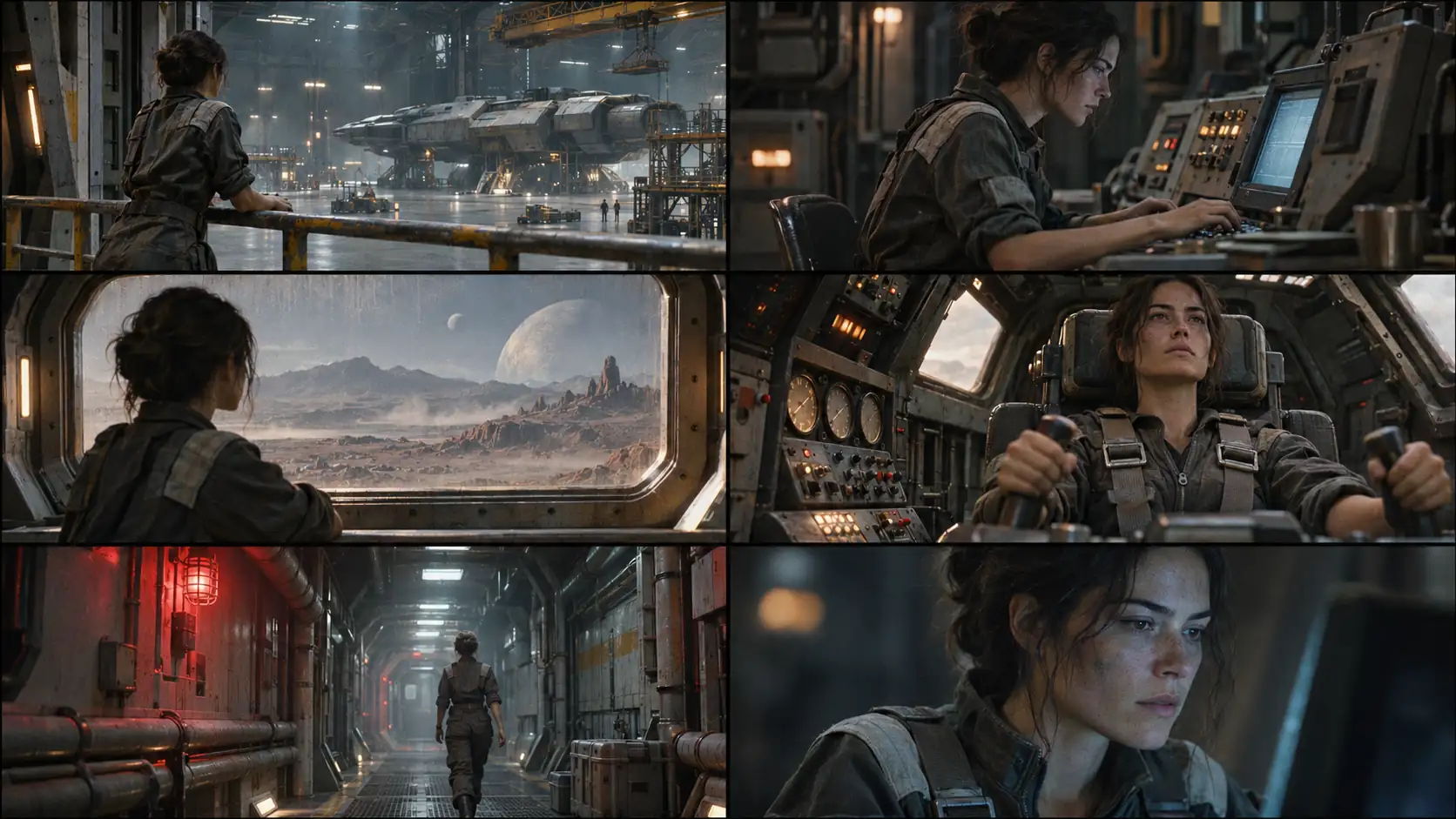
Six scenes cover the genre’s visual spine: the vast hangar, the engineer at the console, the alien landscape through a window, the cockpit, the service corridor and the screen-light close-up. Each scene isolates a different signal — scale, work, wonder, control, danger and the human face.
| Scene | Light | Lens | Prompt anchor |
|---|---|---|---|
| Vast hangar | Cold industrial key, warm work lamps, haze. | 24mm, wide. | Engineer small at a railing, enormous spacecraft above. |
| Engineer at console | Cold screen key, warm practical behind. | 50mm, medium. | Face lit by a console, hands on analog controls. |
| Alien landscape | Cold daylight through a thick window. | 35mm, wide. | Engineer silhouetted against an unfamiliar horizon. |
| Cockpit | Cold displays, warm instrument glow. | 35mm, two-shot. | Pilot in a cramped seat, screens reflected in the visor. |
| Service corridor | Emergency red, cold ambient. | 35mm, low angle. | Long corridor, cables, one figure walking away. |
| Screen-light close-up | Single cold screen, no fill. | 85mm, close-up. | Half the face in screen light, the rest in shadow. |
How do you keep one look across a sequence?
Fix the ship, the engineer, the palette, the lens and the stock, then change only the scene and the blocking. The second frame should feel like the same vessel on the same day. Keep the screen light cold and the practical accents warm across the set.
Review the sequence as a contact sheet at thumbnail size. Use Soul ID for the engineer and Palette Lock for the accent. The film treatment workflow is where the world’s rules should be decided before the first frame.
What are common sci-fi AI mistakes?
The first mistake is overdesign: every surface has a glowing detail and no surface has texture. The second is the cyberpunk default: purple neon, rain and chrome in every frame. The third is no human scale, so the world feels like a wallpaper. The fourth is inconsistent ship geography between shots.
The fifth is a screen that is pure white with no interface structure. The sixth is a future with no work in it: no maintenance, no wear, no ordinary objects. Science fiction is most convincing when the technology looks used.
- Overdesigned surfaces with no texture.
- Purple neon and chrome as a default future.
- No human figure for scale.
- Ship geography changing between frames.
- Blown-out screens with no structure.
- A world with no maintenance, wear or ordinary objects.
Frequently asked
How do I write a sci-fi movie AI prompt?
Name the human, the scale reference, one industrial light source, the lens and the texture. “Engineer at a railing in a vast hangar, cold industrial key, warm work lamps, haze, 24mm, painted metal and cable bundles” gives the model a world instead of a genre label.
How do I make sci-fi AI images look less generic?
Replace neon and chrome with practical work lights and painted industrial materials. Add one clear technological premise, visible maintenance and a human job in the space. Texture is what separates a film still from a screensaver.
How do I build scale in an AI image?
Put a human in the frame, make the structure continue beyond the edges, repeat modules and add atmospheric haze. A wide lens and a low or eye-level camera help; a longer lens is for the human detail.
How do I light a sci-fi console scene?
Use the screen as a cold key or strong fill, keep a warm practical elsewhere and leave a dark area for the eye to rest. Do not blow the screen out to pure white, and keep the skin readable.
How do I keep a sci-fi sequence consistent?
Fix the ship, engineer, palette, lens and stock, then change only scene and blocking. Review the set as a contact sheet at thumbnail size before rendering more frames.
Does Soul Cinema generate sci-fi video?
No. Soul Cinema renders stills and keyframes. A sci-fi sequence can be planned as a storyboard or treatment, but motion and editing happen in a separate video workflow.
Your first cinematic frame is one prompt away
Sign in with Google, pick a plan and keep every still at the resolution the model produced. Plans from $12/month, cancel at any time. No watermark, no re-encode.