
Cinematic fashion editorial AI
A material-aware editorial workflow: fabric-specific lighting, consistent garment and model, 4:5 and 2:3 crops, and a six-frame campaign sequence.
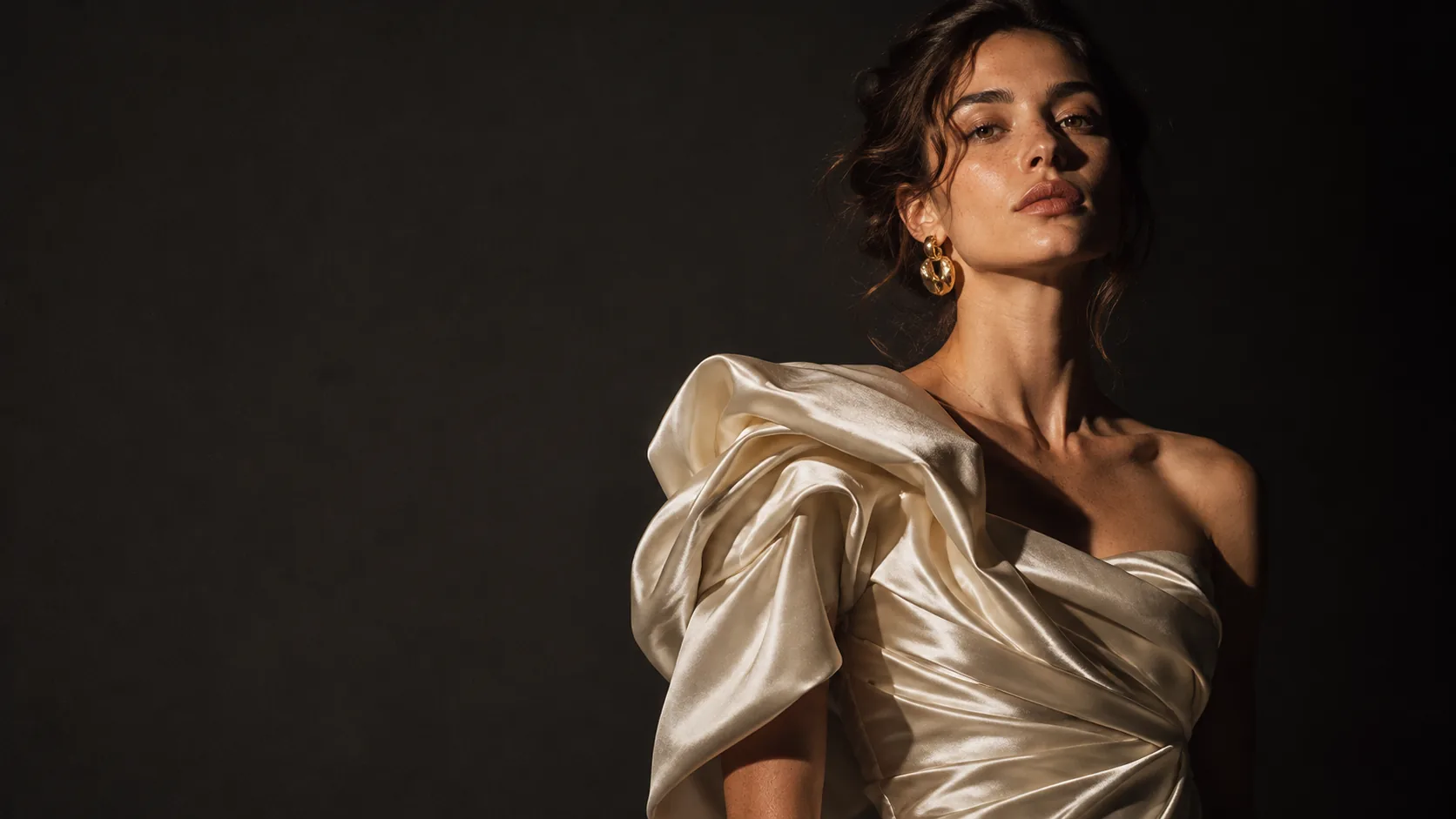
What makes fashion editorial cinematic?
Fashion editorial is a story told through clothes. The garment is the subject, the model is the character, and the light has to describe both. A catalog image shows the product clearly; an editorial image makes the product feel like part of a world.
Cinematic editorial adds three things: a light idea that sculpts the fabric, a pose that implies a moment rather than a catalog stance, and enough negative space for the image to breathe. The frame should feel like a still from a film about this person, not a product shot with a moody grade.
Start with the portrait workflow for face and skin, then use this page for garment, fabric and campaign continuity. The lighting cheat sheet covers the source vocabulary.
How does fabric change the light?
Fabric decides how the light behaves. Silk wants a backlight or a grazing side light to show sheen and folds. Wool wants directional hard light to reveal texture. Leather wants a small source for a controlled specular highlight. Sequins want diffusion, or the highlights become a field of white dots.
Name the fabric and the light behavior in the prompt. “Ivory silk with a warm rim light” gives the model a material and a source. “Fashion editorial lighting” gives it a genre label and a default studio look.
| Fabric | Light behavior | Best setup | Failure mode |
|---|---|---|---|
| Silk | Sheen, soft folds, bright edge. | Backlight or grazing side light. | Flat front light kills the sheen. |
| Wool | Matte texture, deep shadow. | Hard directional side light. | Soft light turns it into felt. |
| Denim | Visible weave, stiffness. | Hard light with a low fill. | Overexposure loses the weave. |
| Leather | Specular highlight, rigid folds. | Small source, controlled angle. | Broad light becomes plastic. |
| Sequins | Many small highlights. | Diffused light or a softbox edge. | Hard light becomes visual noise. |
| Sheer | Transparency and layering. | Backlight with a dark background. | Front light flattens the layers. |
Which editorial lighting setups work?
Five setups cover most editorial work: hard side key, clamshell, single source with a dark background, backlight with fill, and direct flash. Each one produces a different relationship between the garment and the space around it.
Pick the setup by the story, not by fashion convention. A hard side key makes the model sculptural and the fabric architectural. A clamshell makes the skin flawless and the mood commercial. A single source with a dark background makes the image intimate and severe.
- Hard side key: sculpture, fabric shadow, editorial severity.
- Clamshell: clean skin, commercial beauty, low contrast.
- Single source and dark background: intimate, gallery-like.
- Backlight with fill: sheen, movement, rim on the silhouette.
- Direct flash: raw, candid, campaign energy.
- One setup per story, not one of each.
How do you keep the model and garment consistent?
Lock the face and the body proportions first. Use a reference pack with front, three-quarter and profile views, and keep the same lens and distance across the campaign. Then lock the garment details: neckline, sleeve, seam, fabric, color.
A campaign fails when the same jacket changes cut between frames. Describe the garment in the same words every time, and keep the light direction fixed so the fabric reads consistently. Review the set as a contact sheet before adding more looks.
Keep the face with Soul ID and the palette with Palette Lock. The character reference sheet is the place to define the model before the campaign starts.
Which crops and ratios should the campaign use?
Editorial work usually needs 4:5 for portrait covers, 2:3 for full-page print, 1:1 for social and 16:9 for a campaign film still. Render the ratio you will place; cropping a 4:5 portrait into a 16:9 banner usually cuts the garment at the waist.
Keep the garment inside the safe area. If the image will be cropped for multiple placements, compose with the full look in the center and enough margin around the shoulders and hem. Test the crop before the final render, not in post.
| Placement | Ratio | Composition note |
|---|---|---|
| Editorial cover | 4:5 | Full look, headroom, title-safe strip. |
| Print spread | 2:3 | Vertical garment shape, room for type. |
| Social feed | 1:1 or 4:5 | Center the garment, keep hands in frame. |
| Campaign film still | 16:9 | Environment and movement, garment on thirds. |
| Lookbook page | 4:5 | Consistent distance across the series. |
| Billboard / banner | Wide crop | Separate render, not a crop of the portrait. |
How do you build a campaign sequence?
A six-frame campaign covers the story: the portrait, the fabric detail, the full look, the environment, the two-shot and the closing frame. Each image should advance the same character and the same light logic. Change the pose and the distance, not the world.
Keep the sequence in a fixed order and review it as a strip. If the light direction flips between the portrait and the detail, the campaign loses its continuity. If the environment frame introduces a new palette, the story changes films.
| Frame | Job | Distance | Light |
|---|---|---|---|
| Portrait | Face, mood, opening statement. | Medium close-up. | Key on the eyes, one shadow side. |
| Fabric detail | Texture and construction. | Close-up. | Grazing light across the surface. |
| Full look | Silhouette and proportion. | Full body. | Same key, wider frame. |
| Environment | Place and scale. | Wide. | Same direction, more ambient. |
| Two-shot | Relationship and story. | Medium two-shot. | One source covering both faces. |
| Closing | Afterimage. | Wide or back view. | Rim light, negative space. |
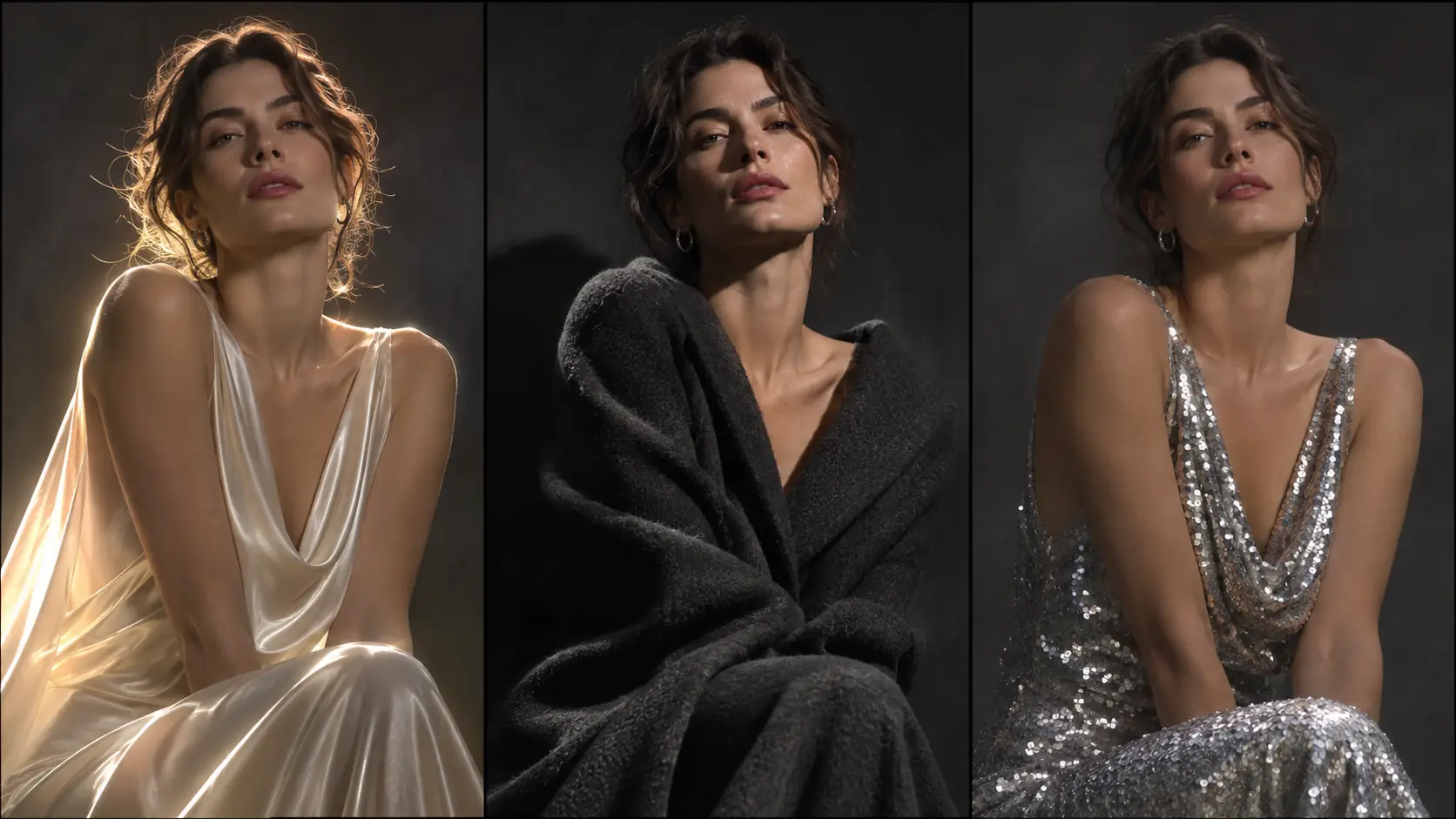
Which six editorial briefs should you try?
Six briefs cover the range: the sculptural silk portrait, the wool tailoring story, the leather night portrait, the sheer backlit figure, the sequin close-up and the environmental campaign frame. Each one pairs a fabric with a light idea and a place.
| Brief | Fabric | Light | Prompt anchor |
|---|---|---|---|
| Sculptural silk | Ivory silk. | Backlight with soft fill. | Sheen on the shoulder, deep folds, charcoal backdrop. |
| Wool tailoring | Charcoal wool. | Hard side key. | Visible weave, sharp lapel shadow, concrete wall. |
| Leather night | Black leather. | Small hard source. | Specular highlight, wet street, neon rim. |
| Sheer backlit | Sheer white. | Backlight, dark background. | Layered transparency, silhouette, quiet pose. |
| Sequin close-up | Silver sequins. | Diffused softbox edge. | Controlled highlights, skin texture, tight crop. |
| Environmental | Campaign look. | Same key, wider ambient. | Model small in the location, garment reads at distance. |
What are common fashion editorial AI mistakes?
The first mistake is lighting every fabric the same way. The second is a catalog pose with a cinematic grade. The third is a garment that changes cut between frames. The fourth is a crop that removes the hem or the hands.
The fifth is too many competing colors in one image. The sixth is over-retouched skin that no longer matches the fabric texture. Editorial is a balance between the garment, the face and the world; if one dominates completely, the image stops being fashion.
- One lighting setup for every fabric.
- Catalog pose with a moody grade.
- Garment details changing between frames.
- Crops that cut the hem or hands.
- Too many accent colors in one look.
- Plastic skin against textured fabric.
Frequently asked
How do I write a cinematic fashion editorial prompt?
Name the garment and fabric, the light setup and direction, the pose, the lens and the backdrop. For example: “ivory silk gown, hard side key from camera-left, deep shadow, 85mm, charcoal seamless backdrop, visible fabric sheen.”
How do I make fabric look real in AI images?
Match the light to the material. Silk needs backlight or grazing side light for sheen, wool needs hard directional light for texture, leather needs a small source for a controlled highlight, and sequins need diffusion.
Which aspect ratio is best for fashion editorial?
4:5 for covers and social, 2:3 for print spreads, 1:1 for feed, and 16:9 for campaign film stills. Render the ratio you will place instead of cropping a portrait into a banner.
How do I keep the same model across a campaign?
Use a reference pack with front, three-quarter and profile views, lock the face with Soul ID, keep the lens and distance fixed, and review the campaign as a contact sheet before adding looks.
How many images should a fashion campaign have?
Six frames cover most campaigns: portrait, fabric detail, full look, environment, two-shot and closing. Each frame should change the pose or distance, not the light logic.
Does Soul Cinema design the garment?
No. Soul Cinema renders the image from your description. The garment design, pattern and construction need to exist in the brief or reference before generation.
Your first cinematic frame is one prompt away
Sign in with Google, pick a plan and keep every still at the resolution the model produced. Plans from $12/month, cancel at any time. No watermark, no re-encode.