
AI character reference sheet: build one that works
A six-view template for fixing face, hair, body and wardrobe before a scene, plus the prompt translation that makes the sheet reusable.
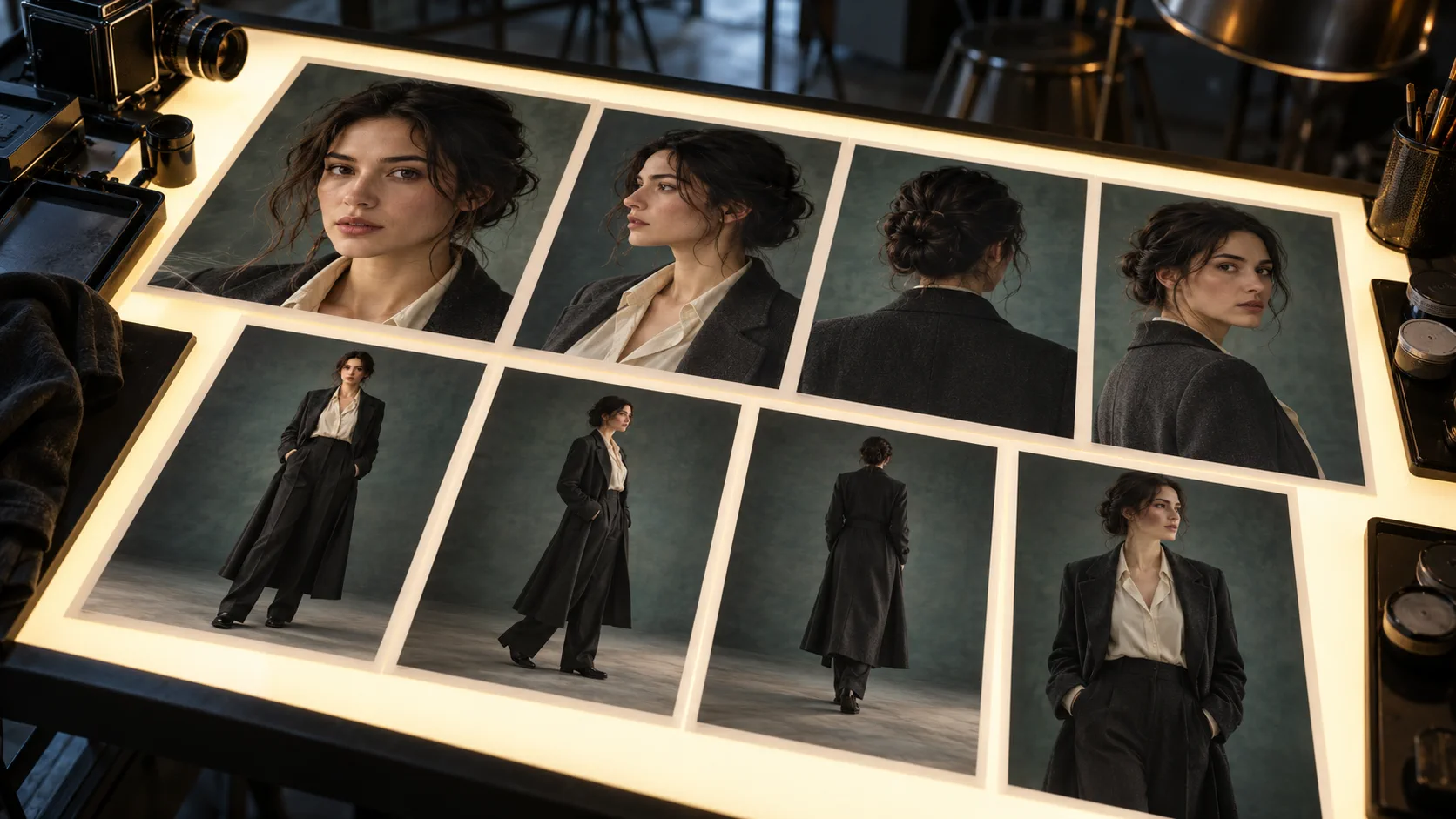
What belongs on an AI character reference sheet?
An AI character reference sheet should show the minimum set of views needed to identify one person: front, three-quarter, profile, full body and at least one neutral expression. Add close details only when they are part of the character, such as a scar, a specific earring or a repaired jacket seam. Decorative poses and dramatic lighting belong later.
The sheet is a source of truth, not a mood board. Its job is to remove ambiguity before a scene prompt introduces movement, costume changes or a new environment. If two references show different jawlines, hair lengths or coat silhouettes, the model receives two characters and will choose between them.
Which views should the reference sheet include?
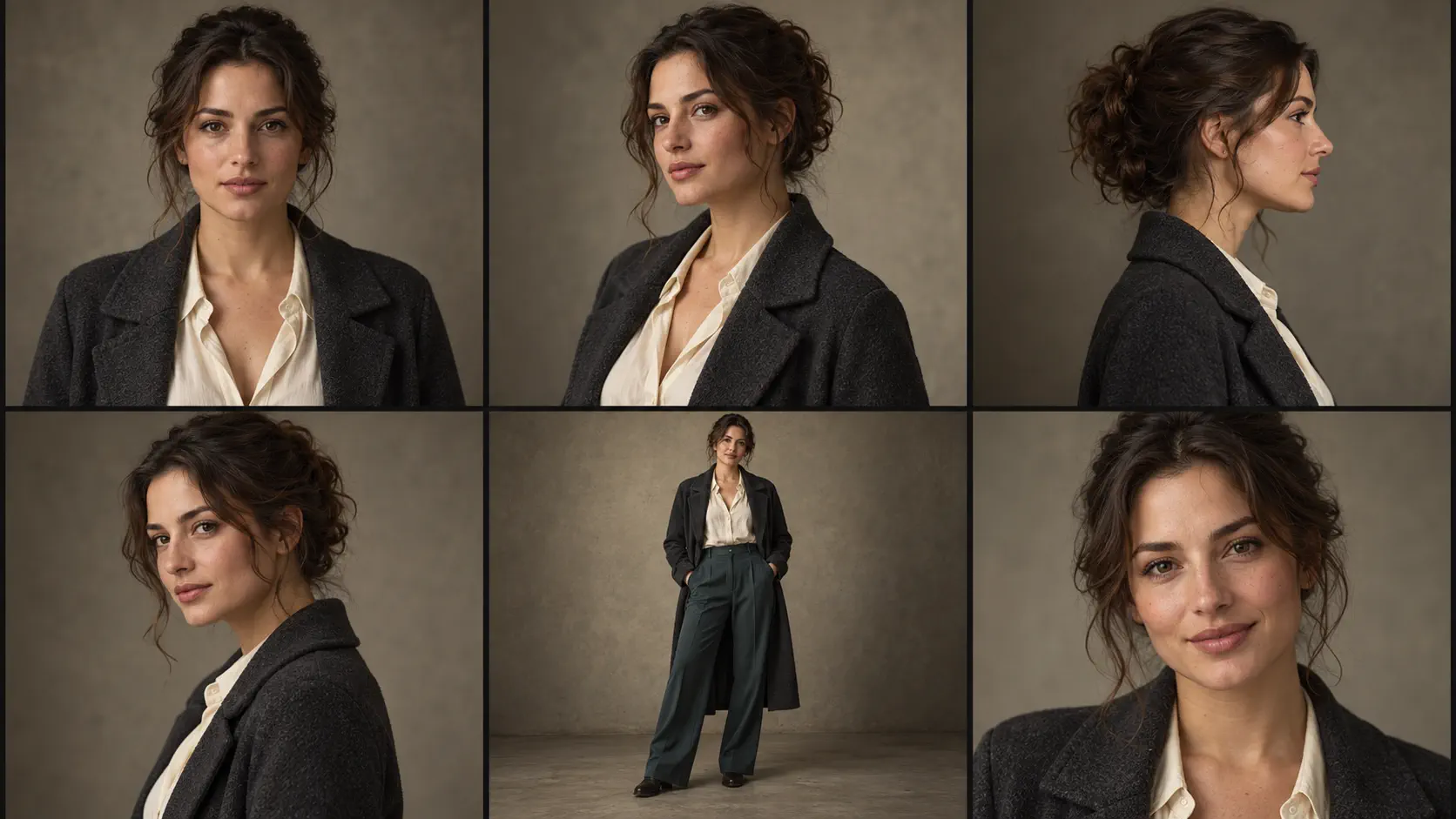
Six views are enough for most stills and video tests. Keep the person, wardrobe and backdrop consistent so the only change is camera position. This makes the sheet useful both as a human approval document and as a reference set for the model.
| View | What it fixes | Prompt note |
|---|---|---|
| Front portrait | Face shape, eye spacing, brow line and hairline | neutral expression, looking directly at camera, soft even light |
| Three-quarter left | Nose profile, jaw depth and cheek structure | three-quarter view from subject’s left, eyes just off camera |
| True profile | Nose, chin, ear position and hair volume | true profile, nose clear of cheek line, neutral background |
| Three-quarter right | Asymmetry and consistency from the opposite side | three-quarter view from subject’s right, same expression |
| Full body | Height impression, build and wardrobe silhouette | full body visible, relaxed standing pose, feet in frame |
| Expression close-up | Natural range without changing identity | relaxed half-smile, same face and wardrobe, 85mm portrait lens |
Which wardrobe details survive an AI re-render?
Large shapes survive better than small fashion adjectives. A charcoal wool overcoat with wide lapels and a cream silk shirt will remain recognizable across angles. “Elegant outfit” will not. Name the garment, colour, fabric, neckline, sleeve and one silhouette detail that should stay fixed.
Accessories are less stable because they introduce small objects the model must reproduce from several viewpoints. If an earring, watch or necklace defines the character, include it in the reference and repeat it in the identity block. If it is optional, remove it from the source set so it does not appear randomly.
- Garment type and silhouette before styling language.
- Colour names that can be translated into a palette or hex reference.
- Fabric texture where it changes how light behaves.
- Neckline, lapel, pocket and cuff details that remain visible in several views.
- Accessories only when they are canonical to the character.
- Shoes in the full-body frame if height and stance matter.
How do you make the reference sheet itself?
Generate the front portrait first. Approve the face, hair and wardrobe at 2K before making any more views. Then render the three-quarter and profile views with the first portrait attached as the reference. Use the same wording for identity and wardrobe, and change only the camera block.
Do not turn the sheet into a single collage prompt too early. Separate renders are easier to inspect and easier to use as individual references. Once the six views hold, arrange them into a contact sheet for approval. The final set can live beside the character in your project files.
- Render the front portrait at 2K and lock the identity wording.
- Add three-quarter and profile views one at a time.
- Use a neutral full-body frame to fix proportions and wardrobe.
- Approve the face at thumbnail size across the full set.
- Keep neutral lighting; save dramatic looks for scene tests.
- Label the set in your own project notes, not inside the image.
How do you turn the sheet into a consistency prompt?
Translate the sheet into four fixed sentences: face, hair, body and wardrobe. Keep them exactly the same in every scene prompt. The scene adds location, action, camera and light after the lock. This creates a clean boundary between “who this is” and “what happens next.”
The prompt structure is expanded in AI character consistency prompts. For the product workflow, compare the broad character consistency guide with the reference-lock controls in Soul ID character.
Face: same adult woman, oval face, warm olive skin, dark brown eyes, small scar above the left eyebrow.Hair: dark brown wavy hair, centre part, loose strands at the temples, low bun at the back.Body: average height, narrow shoulders, upright posture, natural hands.Wardrobe: cream silk shirt, charcoal wool overcoat, wide lapels, no necklace, same look in every frame.
What mistakes make a reference sheet unreliable?
The biggest mistake is treating beauty as identity. A flattering portrait with a tilted head and one visible eye is a poor reference because it hides the feature spacing the next render needs. The second mistake is mixing lighting: one warm image, one cool image and one neon image teach colour changes as part of the face.
A useful sheet is intentionally a little boring. It is neutral enough to be reused, detailed enough to prevent invention and consistent enough that any two panels look like the same person. Save the cinematic hero portraits for the page, not for the source set.
- Different hair styling in each panel.
- Strong expression or head tilt hiding facial structure.
- Mixed white balance and lighting direction.
- Wardrobe changes without a reason in the project.
- Low-resolution or heavily retouched skin.
- Several people in the frame without a clear primary reference.
When is the reference sheet finished?
The sheet is finished when a new scene can be rendered without redefining the character. Put the six views side by side, then request a new medium shot in a different location. If the face, hair and wardrobe arrive intact, the source set is working. If anything drifts, return to the reference before adding more scene detail.
This acceptance test matters more than the number of views. Three excellent references can outperform twelve inconsistent ones. Finish with the smallest set that produces a reliable new frame, and keep every approved image at the resolution the model produced.
Frequently asked
What is an AI character reference sheet?
It is a set of approved images showing one character from several useful angles, usually front, three-quarter, profile and full body. It acts as the visual source of truth for later scene prompts.
How many images should a character reference sheet have?
Six views cover most workflows: front, both three-quarter angles, profile, full body and a neutral expression. Start with three core views and add the rest only if they improve consistency.
Should a character reference sheet include expressions?
Include one neutral expression first. Add a second expression only after the neutral set holds, because strong emotion can hide the underlying facial structure.
Can I generate the whole reference sheet in one image?
A single collage is useful for presentation, but separate renders are better for creating and checking the reference. Generate each view individually, approve the set, then combine the approved frames into a sheet.
What lighting should I use for AI character references?
Use soft, directional, neutral lighting that shows skin texture and facial structure without a strong colour cast. Keep the same lighting direction and white balance across the set.
Does a reference sheet guarantee character consistency?
No. It gives the model reliable evidence, but the prompt must also repeat the same identity and wardrobe facts. Test a new scene before assuming the lock will hold.
Your first cinematic frame is one prompt away
Sign in with Google, pick a plan and keep every still at the resolution the model produced. Plans from $12/month, cancel at any time. No watermark, no re-encode.