
Night flash photography AI
A direct-flash workflow for AI stills: hard shadow, fast falloff, one ambient source and honest skin, without the soft studio look.
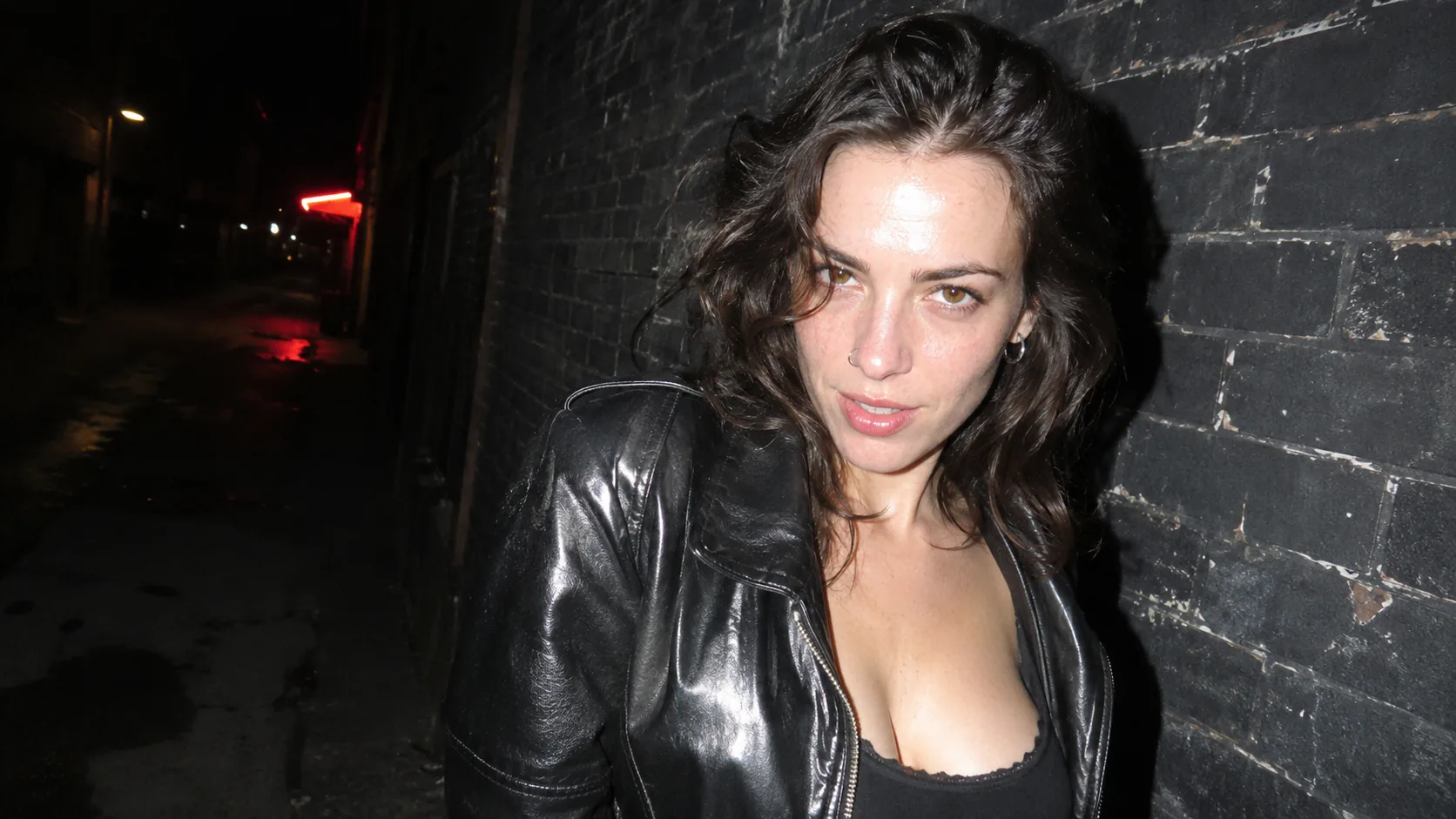
What makes direct flash look real?
Direct flash is a small, hard source sitting almost on the lens axis. It lights the subject brightly, drops off fast with distance, and throws a hard shadow onto whatever is behind. The background usually stays dark because the flash never reaches it. That combination — bright face, fast falloff, black background — is the signature.
The look feels spontaneous because it is technically imperfect. Foreheads and jackets clip slightly, skin shines, the shadow is ugly, and the framing is often a little off. A perfectly balanced flash portrait with a soft shadow reads as studio lighting, not as a night snapshot.
This is the hard-light branch of the cinematic lighting guide. For available-light night portraits, use the night portrait workflow; for the film texture that sells the snapshot, see film grain.
Which flash setup should you prompt?
There are five useful setups: on-camera direct, off-camera side, bounced, fill flash and slow sync. Each one changes the shadow direction and how much of the background survives. Pick the setup before you describe the subject, because the shadow is the tell.
On-camera direct is the rawest and the most recognizable. Off-camera side flash gives a sculpted face and a dramatic wall shadow. Bounced flash softens the light and loses the snapshot edge. Fill flash balances a bright ambient background. Slow sync keeps ambient color and adds motion smear.
| Setup | Shadow | Background | Best for |
|---|---|---|---|
| On-camera direct | Hard shadow directly behind the subject. | Mostly dark, fast falloff. | Nightlife, candid, raw snapshot. |
| Off-camera side | Long hard shadow across the wall. | Dark with one lit edge. | Editorial, character, dramatic portrait. |
| Bounced | Soft shadow, low contrast. | Partially readable. | Interiors, natural-looking reportage. |
| Fill flash | Soft frontal fill, ambient shadows remain. | Readable background. | Dusk, street scenes, event coverage. |
| Slow sync | Hard flash plus ambient motion smear. | Colored ambient and light trails. | Nightlife, movement, energy. |
| Flash through gel | Hard shadow with a colored edge. | Dark background with a color accent. | Music, fashion, stylized night. |
How do you describe falloff and background?
Describe distance, not just darkness. “Subject one meter from a brick wall, flash lighting the wall hot behind her, the rest of the alley black” gives the model a falloff curve. “Dark background” alone often produces a flat black cutout with no wall at all.
The background needs one point of information: a brick texture, a doorframe, a distant neon sign, a parked car. It should be dim but present, so the flash reads as a source in a real place. If the background is pure black, the portrait looks composited.
- State the subject-to-wall distance.
- Let the wall catch a hot pool of flash.
- Keep the rest of the background dark but present.
- Add one ambient sign or window for color.
- Avoid a perfectly even black background.
- Let the shadow explain the flash position.
How do you keep skin honest?
Flash reveals texture. It shows pores, shine, stubble, freckles and the real shape of the face. That is the point. If the prompt asks for smooth, glowing or airbrushed skin, the result stops looking like flash and starts looking like a beauty render.
Allow a small highlight on the forehead, nose or cheek. A little shine is evidence of a direct source. Keep the shadow side of the face dark but not black, and avoid symmetric lighting; even on-camera flash is slightly off-axis in real life.
| Problem | Cause | Fix |
|---|---|---|
| Plastic skin | Beauty retouch or “glow”. | Ask for pores, shine and natural texture. |
| Flat face | Perfectly on-axis light with no shadow. | Offset the flash slightly, keep a shadow under the jaw. |
| Blown white face | Flash too strong with no ambient. | Ask for slightly overexposed highlights, not a white cutout. |
| Studio look | Soft, large source language. | Name a small direct flash and a hard shadow. |
| Gray background | Ambient too bright. | Lower the ambient, let the flash falloff go black. |
Which lens and framing sell the snapshot?
A 28mm to 35mm lens is the classic compact-camera flash look. It includes the room, distorts the edges slightly and forces the photographer close. An 85mm flash portrait is possible, but it reads as fashion rather than as a snapshot.
Frame it like a real photograph: the subject is not perfectly centered, the horizon is slightly tilted, and there is some empty dark space. Direct eye contact or a caught mid-expression works better than a posed smile. The imperfection is what makes the image feel found.
- 28mm to 35mm for the compact-camera look.
- Close distance, wide framing.
- Slightly off-center subject.
- Imperfect horizon or handheld tilt.
- Candid expression over a posed smile.
- Some empty dark space in the frame.
How do you keep the flash look across a series?
Fix the flash position, the subject-to-wall distance, the ambient source and the lens. The shadow length and the falloff are the continuity cues; if they change, the series looks like different photographers. Keep the same wall or the same kind of interior across the set.
Review the frames as a contact sheet at thumbnail size. The shadow should point the same way in every frame. Keep the face with Soul ID and the color with Palette Lock. The film grain guide covers the texture that makes the snapshot feel analog.
Which six night flash portraits should you brief?
Six briefs cover the setup range: the alley wall, the party snapshot, the off-camera wall shadow, the bounced interior, the dusk fill and the slow-sync street. Each one uses the flash for a different reason and gives the background a different amount of light.
| Portrait | Setup | Background | Prompt anchor |
|---|---|---|---|
| Alley wall | On-camera direct. | Brick wall hot behind, rest black. | Hard shadow on brick, slight forehead shine, 28mm. |
| Party snapshot | On-camera direct with one neon ambient. | Dark room with colored signs. | Direct flash, red neon edge, candid laugh, imperfect framing. |
| Off-camera wall shadow | Flash from camera-left on a stand. | Long hard shadow across the wall. | Side flash, dramatic wall shadow, dark background. |
| Bounced interior | Flash bounced off a ceiling. | Partially readable room. | Soft frontal light, low contrast, reportage feel. |
| Dusk fill | Fill flash against a blue-hour sky. | Readable sky and street. | Subject lit, dusk sky behind, balanced exposure. |
| Slow-sync street | Flash with a slow shutter. | Neon trails and ambient color. | Sharp face, smeared lights, night movement. |
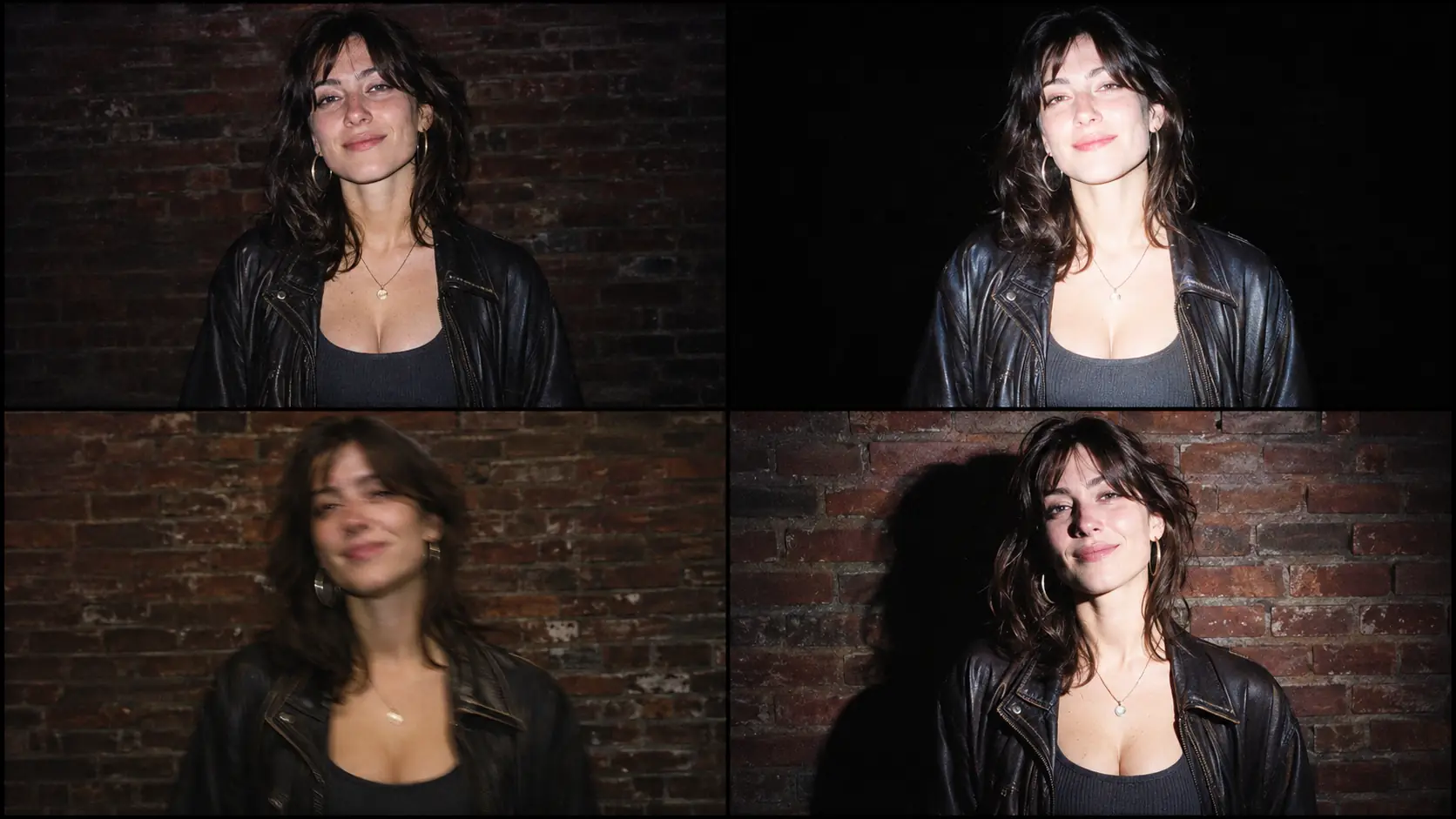
What are common night flash AI mistakes?
The first mistake is asking for “flash photography” and getting a soft studio light. The second is a perfectly black background with no wall or place cue. The third is smooth, plastic skin. The fourth is a shadow that points in a different direction from the flash.
The fifth is a wide-angle look without the close distance, which produces a normal portrait with a bright face. The sixth is over-lighting the background, which removes the falloff that defines the look. Flash is a distance problem before it is a color problem.
- “Flash” that renders as a soft studio source.
- Pure black background with no place cue.
- Smooth, retouched skin.
- Shadow direction that contradicts the flash.
- Wide lens with no close-distance distortion.
- A background lit as brightly as the subject.
Frequently asked
How do I write a direct flash AI prompt?
Name a small on-camera flash, the hard shadow it casts, the subject-to-wall distance, the fast falloff and one ambient source. Add a 28mm to 35mm lens, slight highlight clipping and visible skin texture.
Why does my AI flash look like studio lighting?
The prompt probably describes a soft or large source. Ask for a small direct on-camera flash, a hard shadow directly behind the subject and a background that falls rapidly into darkness.
How do I get the dark background with a lit subject?
Describe distance and falloff: the subject close to a wall, the wall catching a hot pool of flash, the rest of the scene black. Keep one dim ambient sign or window so the background still has a place cue.
Should flash portraits have shiny skin?
A little shine is correct. Direct flash reveals texture and produces small highlights on the forehead, nose or cheek. Avoid “glowing” or “airbrushed” language, which removes the evidence of the source.
Which lens gives the compact-camera flash look?
A 28mm to 35mm lens at close distance. The wide framing includes the room and adds slight edge distortion, which reads as a handheld snapshot rather than a studio portrait.
Can Soul Cinema keep a flash look consistent across a series?
Yes. Fix the flash position, subject-to-wall distance, ambient source and lens. The shadow direction and falloff are the continuity cues; check them on a contact sheet before rendering more frames.
Your first cinematic frame is one prompt away
Sign in with Google, pick a plan and keep every still at the resolution the model produced. Plans from $12/month, cancel at any time. No watermark, no re-encode.