
Polaroid AI prompt
An instant-film workflow: direct flash, soft contrast, color drift, the right print border and a six-print sequence that holds together.
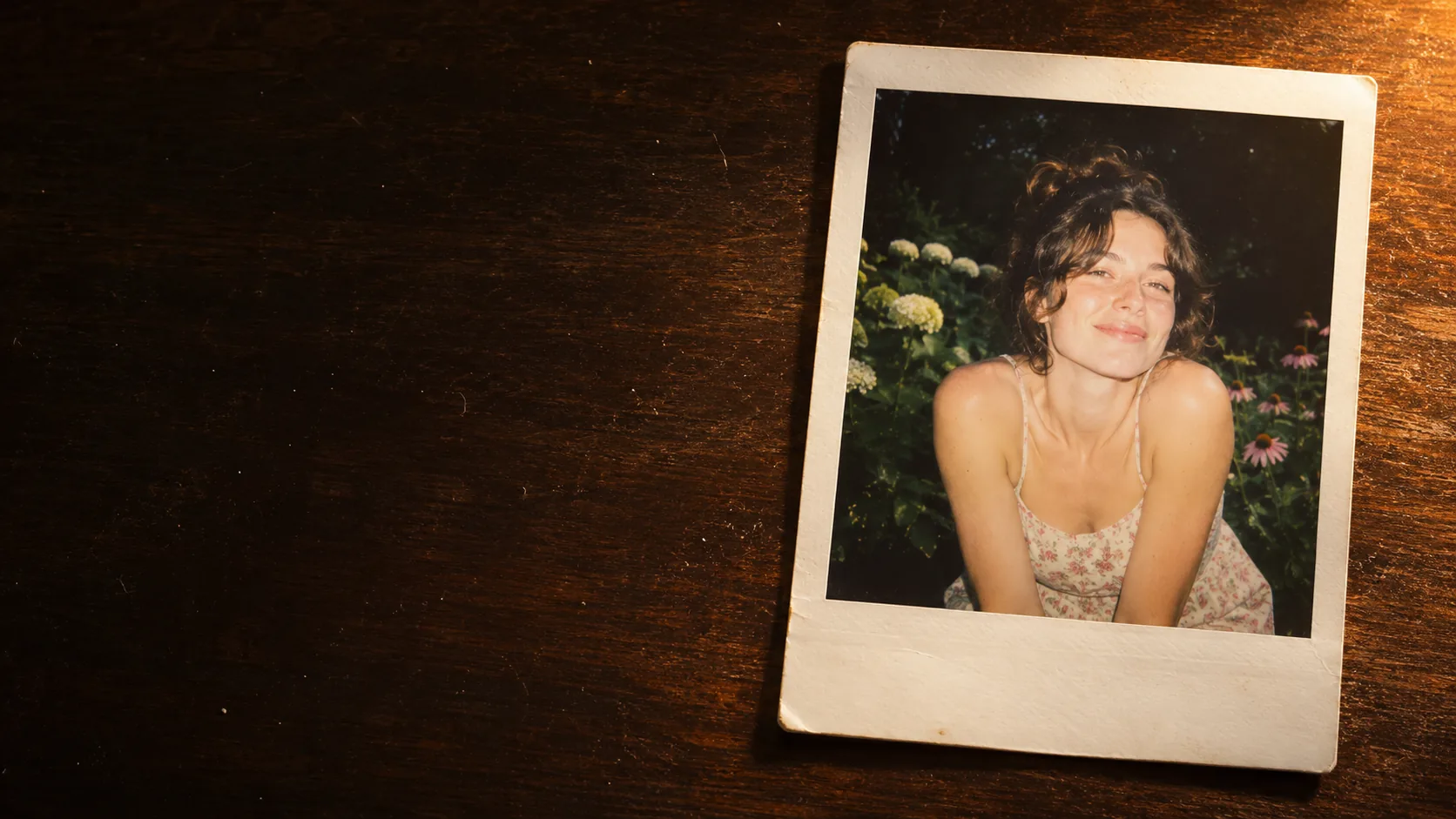
What makes a Polaroid look real?
An instant photograph is a physical object with a light attached to it. The flash is close to the lens, the contrast is soft, the colors drift, the highlights clip, and the print has a white border and a slight bend. The imperfections are the look.
The usual failure is a clean digital image pasted into a white frame. Real instant film has lower resolution, a narrow dynamic range and a specific color response. The frame is not a decoration; it is evidence that the image was made by a camera and printed by chemistry.
The direct flash guide covers the light; this page covers the print. The film grain guide and film stock guide cover the texture that supports the instant look.
Which instant film type should you prompt?
The frame shape and color response depend on the film. Polaroid 600 has the classic square print with a thick bottom border and a cool, contrasty look. SX-70 is softer and warmer. Instax mini is a smaller rectangle with a white border; Instax wide is a wide rectangle. Peel-apart film has a different border and a more chemical color shift.
Name the format if the frame matters. If the image will be placed in a layout, a 1:1 square with a thick bottom border is the most recognizable. If it will be printed as a strip, Instax mini or wide gives a different rhythm.
| Film | Frame | Color | Best for |
|---|---|---|---|
| Polaroid 600 | Square, thick bottom border. | Cool, contrasty, slight cyan shift. | Classic instant look, portraits. |
| SX-70 | Square, similar border. | Warmer, softer, lower contrast. | Nostalgic portraits, interiors. |
| Instax mini | Small rectangle, white border. | Punchy, slightly cool, high contrast. | Party, travel, couple photos. |
| Instax wide | Wide rectangle, white border. | Neutral, clean, moderate contrast. | Landscapes, groups, street. |
| Peel-apart | Square or rectangular, uneven edges. | Chemical, muted, unpredictable. | Artistic, distressed, analog. |
| Expired film | Standard frame, aged print. | Faded, color-shifted, low contrast. | Memory, archive, nostalgia. |
How do you prompt the flash and falloff?
Direct on-camera flash is the signature. It lights the subject hard, falls off quickly and leaves the background dark. The foreground is often slightly overexposed; the shadow sits directly behind the subject. If the prompt asks for soft studio light, the instant look disappears.
Describe the distance to the background. A subject close to a wall gets a hard shadow and a bright wall; a subject in an open street gets a dark background. The falloff is what makes the image feel like a snapshot rather than a portrait session.
- Direct on-camera flash, close to the lens.
- Slightly overexposed foreground.
- Fast falloff to a dark background.
- A hard shadow directly behind the subject.
- One ambient sign or window for color.
- No softbox, no rim light, no studio setup.
How do you describe the border and the print?
The border is part of the image. Describe a white instant border with a thicker bottom edge, a slight bend, a matte paper surface and a few dust specks. If the print is lying on a table, describe the table and the light raking across the paper.
Do not ask for handwriting, dates or captions. The model will render text that looks wrong and cannot be edited. Leave the bottom border blank and add any real note in a design tool or by hand.
| Detail | Prompt cue | Why |
|---|---|---|
| Border | White instant border, thicker bottom edge. | The most recognizable instant-film cue. |
| Paper | Matte paper, slight bend, fine texture. | Makes the print feel physical. |
| Surface | Dark wood table, dust, warm lamp. | Places the print in the world. |
| Aging | Faded colors, tiny scratches. | Suggests time and handling. |
| Text | Blank border, no handwriting. | Avoids unreadable AI lettering. |
| Print edge | Slightly uneven chemical edge. | Adds authenticity without damage. |
Which subjects work best on instant film?
Instant film is intimate. It works best on people, small groups, interiors, streets and still life. The direct flash and soft contrast make close subjects feel immediate; vast landscapes lose the effect because the flash never reaches them.
Choose one subject and one moment. A portrait in a garden, a couple in a diner, a friend on a night street, a flower on a table. The image should feel like a memory someone kept, not a campaign with a vintage filter.
| Subject | Why it works | Light |
|---|---|---|
| Portrait | Flash and soft contrast flatter the face. | Direct flash, dark background. |
| Couple | Intimacy and closeness. | Direct flash, close framing. |
| Night street | Hard flash against darkness. | Flash plus one ambient sign. |
| Diner interior | Warm practicals and nostalgia. | Flash plus warm interior light. |
| Still life | Texture and color shift. | Window light or flash. |
| Beach / dusk | Soft ambient and color drift. | Available light, slight underexposure. |
How do you keep a Polaroid series consistent?
Fix the film type, the border, the flash power and the color shift. Change the subject and the place, not the print. A series where one image is warm SX-70 and the next is cool 600 looks like two different cameras.
Review the prints as a grid at thumbnail size. The borders should align, the contrast should match and the color drift should feel like the same film stock. If the set looks like six filters, reduce the variation.
Use the contact sheet workflow to compare the prints, and Palette Lock to keep the color drift consistent across renders.
Which six-print sequence should you brief?
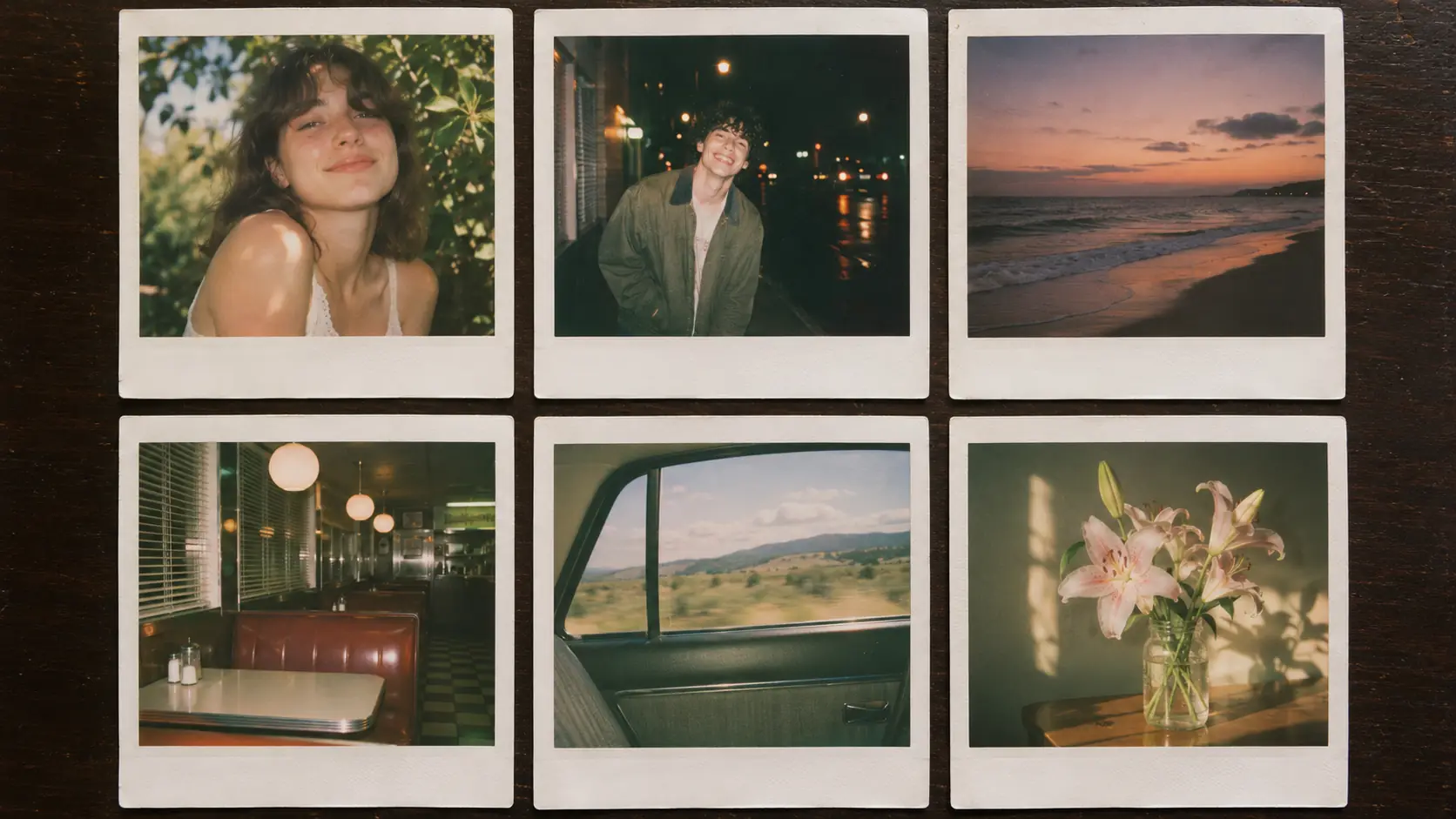
A six-print sequence covers the range: the portrait, the couple, the night street, the interior, the still life and the landscape. Each one uses the same film, border and flash logic but a different subject distance.
| Subject | Light | Prompt anchor | |
|---|---|---|---|
| Portrait | A fictional adult in a garden. | Direct flash, dark background. | Slightly blown highlights, white border, warm skin. |
| Couple | Two people in a diner booth. | Flash plus warm practical. | Close framing, red vinyl, soft color shift. |
| Night street | A friend under a streetlamp. | Flash plus sodium ambient. | Hard shadow, dark street, one warm sign. |
| Interior | A kitchen table in the morning. | Window light. | Soft contrast, faded green, domestic detail. |
| Still life | Flowers in a glass jar. | Window light plus flash fill. | Petal texture, soft shadow, cream border. |
| Landscape | A beach at dusk. | Available light. | Slight underexposure, muted color, wide frame. |
What are common Polaroid AI mistakes?
The first mistake is a clean digital image inside a white frame. The second is soft studio light instead of direct flash. The third is handwriting or dates rendered as text. The fourth is a border with the wrong proportions.
The fifth is a different film look on every print. The sixth is a perfectly flat, undamaged print with no paper texture. Instant film is physical; if the print looks like a PNG with a border, the illusion fails.
- A digital image pasted into a white frame.
- Soft studio light instead of direct flash.
- AI handwriting, dates or captions.
- Wrong border proportions for the film type.
- A different film look on every print.
- No paper texture, bend or dust.
Frequently asked
How do I write a Polaroid AI prompt?
Name the film type, the direct flash, the subject distance, the dark background and the print border. For example: “Polaroid 600 print, direct on-camera flash, a fictional adult in a garden at night, white instant border, slightly blown highlights, soft contrast.”
Why does my AI Polaroid look fake?
It is probably too clean and too evenly lit. Real instant film has direct flash, soft contrast, clipped highlights, color drift, a paper border and slight imperfections. Remove studio-light language and add print texture.
What is the difference between Polaroid and Instax?
Polaroid 600 and SX-70 use a square print with a thick bottom border and a cooler or warmer color response. Instax mini and wide use smaller rectangular prints with a white border and a punchier, cleaner look.
Should a Polaroid prompt include a date or handwriting?
No. AI-rendered dates and handwriting are usually wrong and cannot be edited. Keep the bottom border blank and add any real note in a design tool or by hand.
Which subjects work best on instant film?
People, couples, interiors, night streets and still life. The direct flash and close distance make intimate subjects feel immediate; vast landscapes lose the effect because the flash cannot reach them.
Can Soul Cinema render a physical Polaroid print?
Yes. You can prompt the print as an object on a table, with a white border, paper texture and raking light, or prompt the image inside the frame and add the border in a design tool.
Your first cinematic frame is one prompt away
Sign in with Google, pick a plan and keep every still at the resolution the model produced. Plans from $12/month, cancel at any time. No watermark, no re-encode.