
VHS AI prompt
A tape-first VHS workflow: 4:3 framing, soft contrast, chroma bleed and scanlines, plus a clean-to-heavy test and six period scene briefs.
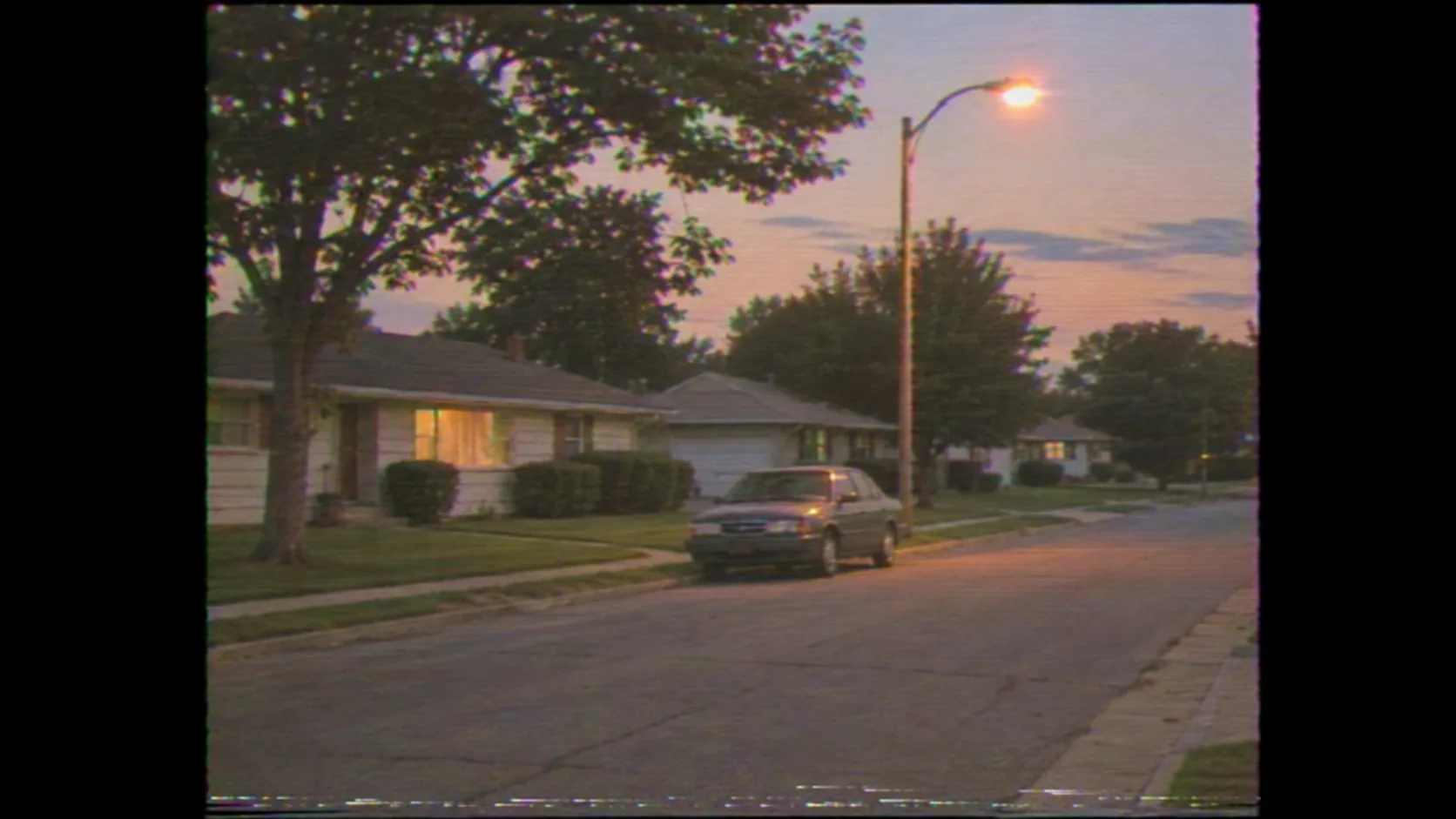
What makes a VHS look real?
VHS is a consumer video format, not a color preset. The frame is 4:3, the resolution is low, the contrast is soft, the color bleeds sideways, the highlights bloom and the tape adds noise and tracking errors. The look comes from those limits, not from a single “retro” filter.
The usual failure is a sharp, high-contrast image with a scanline overlay. Real VHS is softer, duller and less stable. The image should feel like it was recorded off a television or shot on a family camcorder, with all the imperfections that implies.
The Polaroid guide covers the instant-print branch of analog nostalgia; this page covers tape. The film grain guide covers the texture that supports the look.
Which VHS era should you prompt?
The era changes the palette and the artifacts. Early 1980s tape is softer, warmer and more prone to wobble. Late 1980s camcorder footage is sharper but still low contrast. 1990s home video is cleaner, with less color bleed. Rental tapes are worn and noisy. Damaged tapes add tracking lines and dropouts.
Name the era and the source. “1990s home video” is a different look from “worn rental tape” or “1983 camcorder”. The subject should match the era: a 1990s suburban street, a mall, a family kitchen, a CRT television.
| Era / source | Palette | Artifacts | Best for |
|---|---|---|---|
| Early 1980s camcorder | Warm, faded, low saturation. | Soft image, wobble, heavy noise. | Family, suburbia, early MTV. |
| Late 1980s camcorder | Neutral, slightly cool. | Sharper image, mild chroma bleed. | Home video, travel, parties. |
| 1990s home video | Cleaner, natural color. | Light scanlines, low contrast. | Suburbia, road trips, malls. |
| Rental tape | Dull, magenta shift. | Worn tracking, dropouts, noise. | Horror, late-night cinema. |
| Damaged tape | Unstable, washed out. | Tracking lines, warble, color bands. | Found footage, memory, decay. |
| TV broadcast | Warm, slightly soft. | Scanlines, signal noise, logo-free. | News, ads, late-night TV. |
How do you prompt the artifacts?
Describe the artifacts as physical tape behavior: horizontal scanlines, chroma bleed to the right of edges, soft focus, low contrast, tape noise, slight tracking wobble at the bottom of the frame. One or two artifacts are enough; all of them at once becomes a glitch effect.
Keep the artifacts consistent across the frame. Chroma bleed should happen at high-contrast edges, not everywhere. Noise should sit in the shadows, not in a uniform overlay. A believable VHS image looks degraded by a format, not by a plugin.
- Horizontal scanlines, subtle.
- Chroma bleed at high-contrast edges.
- Soft focus and low contrast.
- Tape noise in the shadows.
- Slight tracking wobble at the bottom.
- No timestamp, no UI, no channel logo.
How do you frame 4:3 inside a 16:9 image?
VHS is 4:3. If the delivery is 16:9, decide whether to pillar-box the 4:3 frame with black side mattes or to render a native 4:3 image and place it in layout. Do not stretch a 4:3 image to fill 16:9; the proportions will look wrong.
Keep the subject inside the 4:3 safe area. If the image will be cropped again for social, leave margin around the subject and avoid putting important detail at the extreme edges, where tape artifacts are strongest.
| Delivery | Frame | Note |
|---|---|---|
| Web hero | 4:3 pillarboxed in 16:9. | Black side mattes, centered frame. |
| Social post | Native 4:3 or 1:1 crop. | Keep the subject inside the safe area. |
| Video still | 16:9 with a 4:3 insert. | Use the tape frame as a cutaway. |
| 4:3 or 3:2 crop. | Keep the artifacts inside the trim. | |
| Thumbnail | 16:9 with a 4:3 image. | Face large enough to read at 320px. |
| Presentation | 4:3 on a 16:9 slide. | Matte the frame, do not stretch. |
Which subjects work best on VHS?
VHS works on ordinary places and moments: a suburban street, a family kitchen, a mall, a road trip, a night street, a CRT television. The format makes the mundane feel remembered. Epic landscapes lose the effect because the resolution cannot carry the detail.
Choose a subject that belongs to the era of the tape. A 1990s street with a sedan and a streetlamp is more convincing than a modern city with a VHS filter. Clothing, cars and signage should match the period.
| Subject | Why it works | Era |
|---|---|---|
| Suburban street | Ordinary and remembered. | 1980s–1990s. |
| Family kitchen | Domestic intimacy and soft light. | 1980s–1990s. |
| Shopping mall | Consumer culture and fluorescent light. | Late 1980s–1990s. |
| Road trip | Motion, landscape, camcorder. | 1980s–1990s. |
| Night street | Sodium light and bloom. | 1980s–1990s. |
| CRT television | The medium itself. | Any era. |
What is the clean-to-heavy degradation test?
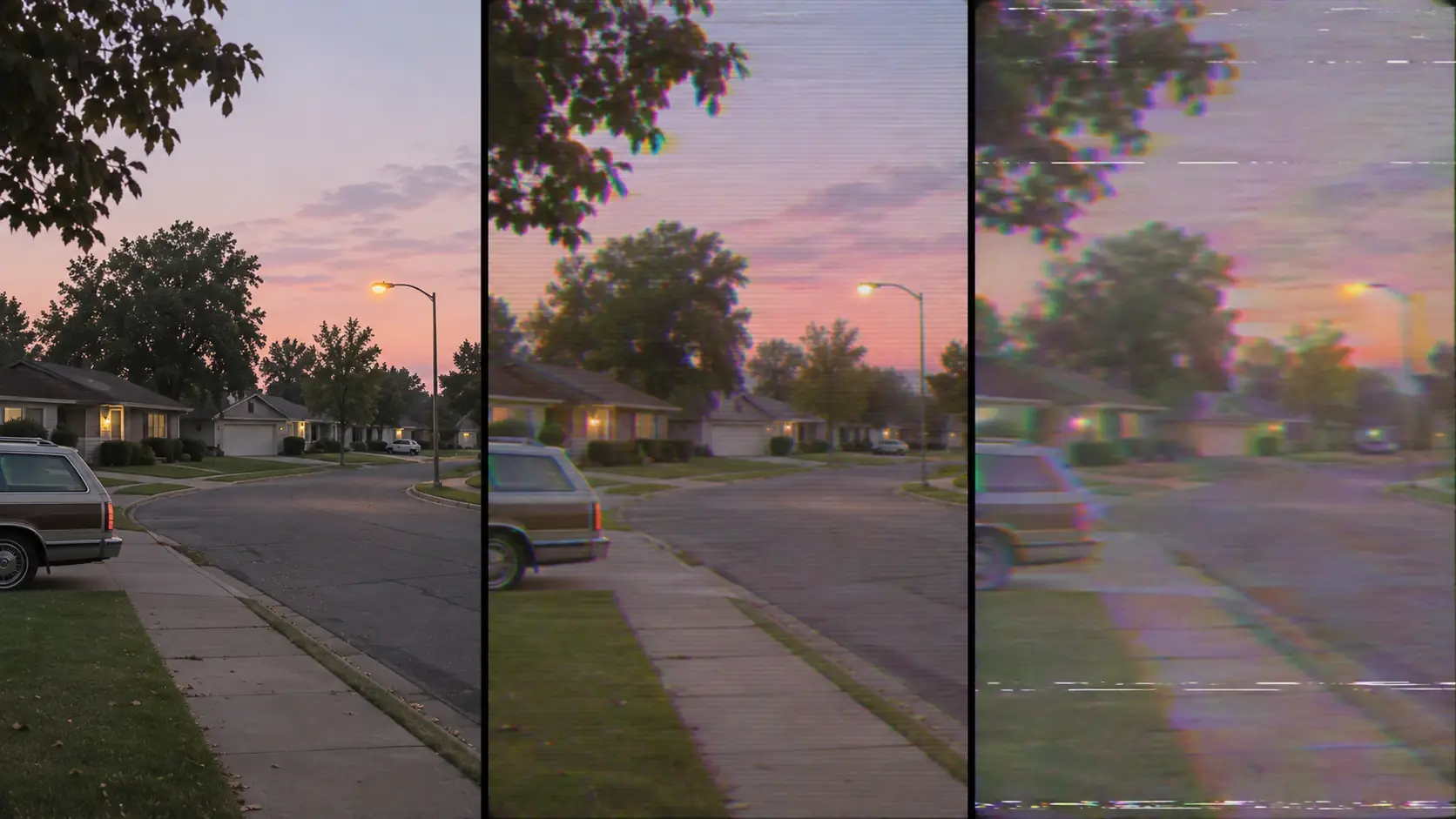
Before committing to a look, render the same scene three ways: clean digital, mild VHS and heavy VHS. The clean frame establishes the composition; the mild frame tests whether the artifacts read at thumbnail size; the heavy frame tests the limit before the image becomes unwatchable.
Pick the version that keeps the subject readable. If the face disappears under noise or chroma bleed, the look is too heavy. VHS should feel like a format, not a broken file.
| Version | Artifacts | Use for |
|---|---|---|
| Clean digital | None. | Composition reference, modern cutaways. |
| Mild VHS | Light scanlines, slight chroma bleed. | Web, social, readable nostalgia. |
| Heavy VHS | Strong bleed, noise, tracking. | Found footage, horror, memory. |
Which six VHS scenes should you brief?
Six scenes cover the format: the suburban street, the family kitchen, the mall, the road trip, the night street and the CRT screen. Each one uses a different era and a different level of artifact.
| Scene | Era | Light | Prompt anchor |
|---|---|---|---|
| Suburban street | 1990s home video. | Dusk ambient, one streetlamp. | Parked sedan, lawns, low houses, soft scanlines. |
| Family kitchen | Late 1980s. | Window light plus warm practical. | Formica table, cereal boxes, soft contrast. |
| Shopping mall | Early 1990s. | Fluorescent overhead. | Escalator, neon storefronts, washed color. |
| Road trip | 1980s camcorder. | Hard daylight through the windshield. | Dashboard, highway, motion blur, tape noise. |
| Night street | Rental tape. | Sodium lamps, neon. | Wet asphalt, bloom, chroma bleed. |
| CRT screen | Any era. | Screen glow in a dark room. | Static, scanlines, curved glass, no channel logo. |
What are common VHS AI mistakes?
The first mistake is sharp detail with a scanline overlay. The second is a timestamp or channel logo that looks like AI text. The third is a 4:3 image stretched to 16:9. The fourth is every artifact applied at full strength.
The fifth is a modern subject with a VHS filter, which breaks the period. The sixth is inconsistent tape behavior between frames. VHS is a format with rules; the look holds when the rules stay fixed.
- Sharp image with a scanline overlay.
- AI timestamps, logos or UI text.
- A 4:3 frame stretched to 16:9.
- Every artifact at full strength.
- Modern cars, clothes or signage in a period scene.
- Tape behavior changing between frames.
Frequently asked
How do I write a VHS AI prompt?
Name the tape era, the 4:3 frame, the soft contrast, the chroma bleed, the scanlines and the subject. For example: “1990s home video, 4:3 frame, quiet suburban street at dusk, soft scanlines, slight chroma bleed, low contrast, one sodium streetlamp.”
Why does my AI VHS look like a filter?
It is probably too sharp and too contrasty. Real VHS is soft, low-contrast and low-resolution, with chroma bleed at edges. Reduce sharpness, lower contrast and add tape noise instead of a scanline overlay.
Should a VHS image be 4:3 or 16:9?
VHS is natively 4:3. If the delivery is 16:9, pillar-box the 4:3 frame with black side mattes or place it as an insert. Do not stretch it to fill the wider frame.
Should a VHS prompt include a timestamp?
No. AI-rendered timestamps and channel logos usually look like gibberish and break the illusion. Keep the frame clean and add any real timestamp in a video editor or design tool.
Which subjects look best on VHS?
Ordinary places and moments: suburban streets, family kitchens, malls, road trips, night streets and CRT screens. The format makes the mundane feel remembered; epic landscapes lose detail.
Does Soul Cinema render the VHS artifacts?
Yes. Soul Cinema can render the soft contrast, chroma bleed, scanlines and tape noise described in the prompt. Motion, audio and any real timestamp belong to a video workflow.
Your first cinematic frame is one prompt away
Sign in with Google, pick a plan and keep every still at the resolution the model produced. Plans from $12/month, cancel at any time. No watermark, no re-encode.